How to Access Your Academic Transcripts
Updated: 2025/12/17
Article #: 253
Unofficial Transcripts:
To generate your unofficial academic transcripts, log in to your Student Portal and navigate to the Timetable & Results tab. From there, click on the Generate Transcripts icon. Your transcripts will automatically download and can be found in your device’s Downloads folder.
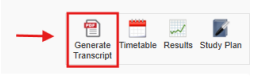
For step-by-step instructions refer to Student Portal Guide - Generating Unofficial Academic Transcripts
Official Transcripts:
If you need an official copy, you must submit a Request for Academic Documentation form available via Student Portal > Workflow quick access icon. Please note that you will receive a free official copy once you have completed your studies.
|
Rate this Topic:
|
|||
|
